DataDesigner:RAWData
- Last edited 11 years ago by Vlash Nytefall
EQ2Emulator: Data Designer - RAW Spawn Data Processing
The Data Designer role is responsible for processing all "raw" content from packet logs, and preparing a zone for the Content Design team to enter. This document will help identify all the tasks currently performed by the Data Designer.
Note: This article only covers raw Spawn data, and none of the many other types of data we gather from packet logs. Reason being is that this is generally a PacketParser tutorial, and most other raw data will no longer be processed by PacketParser in the future.
Contents
Tasks: Data Designer
The Data Designer must be proficient with C++ (PacketParser), EQ2Emulator data structures and opcodes, expert with MySQL and database query writing, and have an expert grasp of what EQ2 Live zones look like when populated. There will be no "guessing" at how content should look - either you know the zone 100%, or you do not work on the zone. We have no more time for re-doing zones because data given to the content team was incorrect!
Processing Packet Logs
Packet Logs are those raw logs collected using the EQ2PacketCollector. Collector is now detectable by SOE and you will be banned for using it, so we no longer offer it to anyone outside the core team. Logs collected since 2007 (we have over 800 logs, 6GB of data!) should provide us with years of server and content development.
A RAW Packet log looks similar to this:
 -- OP_ClientCmdMsg::OP_EqSetPOVGhostCmd --
 6/27/2009 17:15:37
 199.108.12.35 -> 192.168.1.100
 0000:	01 37 8C 00 00 00 FF 01 02 00 E7 6C 14 00 FF FF .7.........l....
 0010:	00 00 00 00 76 16 77 77 00 04 00 66 69 73 68 00 ....v.ww...fish.
 0020:	00 F0 41 00 80 50 38 24 48 00 00 00 FF A5 1E 98 ..A..P8$H.......
 0030:	30 E0 1C 7C F9 C3 3C C1 20 C1 83 42 82 9E 59 BF 0..|..<. ..B..Y.
 0040:	59 BF 81 81 19 C1 10 02 11 F1 66 66 66 20 F9 FF Y.........fff ..
 0050:	FF 3F 80 3F 83 FF FF 08 81 16 7F 7F 0E 8B 02 06 .?.?............
 0060:	02 0E FF FF FF FF 10 3F 10 3F AF FF FF FF FF FF .......?.?......
 0070:	7F 7F 7F 18 0E 00 73 63 68 6F 6F 6C 20 6F 66 20 ......school of
 0080:	66 69 73 68 00 00 00 00 00 00 00 00 00 00 00 00 fish............
 0090	00 06                                           ..
The PacketParser tool will read these collected logs, and using the "structs" files, will determine the data for a given packet. The example above is one (1) packet. A log will consist of thousands of packets. The Parser has many switches that can be used to pull specific data out of a packet log. For example, the -spawns parameter will read only packets containing Spawn information, and write what it finds to the Parser Database tables.
Once the PacketParser has completed analyzing the packet log you specify, it will report what it finds. A typical parser run on -spawns will output data as follows:
00:34:11 I Parser: Loading Data from Packet Log: Commonlands-Ruins-Misc_20090111.log
00:34:16 I Parser: Loading Version Information...
00:34:16 I Parser: Verifying Opcodes...
00:34:16 D Opcodes: Using version '942', version_range1: 942 and version_range2: 954
00:34:17 I Parser: Loading Language Type...
00:34:17 W Mode: CONSOLIDATION mode...
00:34:17 I Parser: Processing Spawns...
00:34:17 D Parser:      Zone Maps...
00:34:17 D Parser:      Spawns...
00:34:18 D Parser: Returning next group ID: 18578
00:34:19 D Parser: Returning next group ID: 18579
00:34:20 D Parser: Returning next group ID: 18579
00:34:20 D Parser: Returning next group ID: 18579
00:34:25 D Parser: Returning next group ID: 18597
00:34:25 D Parser: Returning next group ID: 18597
00:34:25 D Parser: Returning next group ID: 18597
00:34:42 D Parser: Returning next group ID: 18599
00:34:42 D Parser: Returning next group ID: 18599
00:34:42 D Parser:      Cleanup Bad Spawns...
00:34:43 I Parser: Processing Recipes...
00:34:43 I Parser: Processing Recipe Details...
00:34:43 I Parser: Processing Recipe Info...
00:34:43 I Parser: Processing Factions...
00:34:43 I Parser: Processing Collections...
00:34:43 I Results: Took: 32 seconds. Processed file 'Commonlands-Ruins-Misc_20090111.log'
00:34:43 I Results: Parsed:
00:34:43 I Results:     3124 Spawns (253 unique, 253 new)
This output tells us that in the Commonlands-Ruins-Misc_20090111.log, there were 3124 "Spawn" packets discovered, which yielded 253 unique ones (the rest being repeats), and 253 new ones.
Why 3124 Spawns?
 Because everytime the player moved around the zone, the SOE servers send the data to the client,
 even if it is the same exact spawn in the same exact location, the client gets updates from the Server.
Why 253 Unique?
 Because out of 3124 spawn "packets", only 253 spawns were different from each other in some way to
 ensure their uniqueness
Why 253 New?
 Because this was the first log of Commonlands parsed, all 253 Unique spawns were also new. But, should we
 parse a second log from Commonlands, we might see 253 Unique spawns, but not likely anything "new".
Now, the Data Designer must open the MySQL tables for the RAW data, and evaluate if the parsed data is good, or bad.
Analyzing RAW Spawn Data
Analyzing the raw data in the Parser Database means to open your favorite MySQL GUI tool (SQLYog, in my examples) and physically taking a look at the parsed data looking for obviously malformed or missing data.
This example shows the first few "spawns" found while parsing the Commonlands zone above. As you can see, the data is readable, and looks complete.
Figure 1
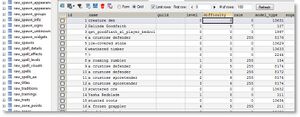

You will want to check all fields, and the multiple spawn-related tables, to ensure all data is this "clean".
Verify RAW Spawn Data
After the Spawns look clean, you will need to manually verify the Zones table data matches as well. ALL ZONES MUST MATCH THE RAW DATA FROM SOE! If any zone data is mismatched, the Parser will not populate your world. You can run a query like this to determine differences in zone data:
SELECT
  rz.*
FROM
  eq2_rawdata.raw_zones rz
  LEFT JOIN eq2raw.zones z
    ON rz.zone_desc = z.description
    AND rz.zone_file = z.file
WHERE z.description IS NULL;
Where eq2_rawdata is your parser database, and eq2dev is your destination World database.
What this query does is take every raw_zone.zone_desc value, and look to see that it exists in the destination database. If not, you have to fix the DESTINATION DATABASE first. All zone data should come from SOE's valid zones, not something you made up by guessing what a zone name might be.
Note: The only time we change a raw_zones.zone_desc value is if the zone is a personalized instance (ie, Johnadams's Apartment). In this case, see below how to consolidate all housing/instance type zones into a single zone record for population.
Duplicate Zones Cleanup
You will notice in your parsings that there may be more than one zone_file entry for a given zone. Eg., qey_ph_1r01. This is a 1-room Qeynosian apartment. Since it's description will be wrong (JohnAdam's Apartment) and that is an INVALID zone name, you'll need to fix that name to be "a one room apartment, version 1" etc... and since there will be many of the same zone_file, now you'll need to consolidate all duplicates into a single zone, or discard the duplicate data. Parser will not populate if player housing zones are not converted to Generic housing zone names!
A query I use to do this is:
 UPDATE IGNORE raw_spawns SET zone_id = 117 WHERE zone_id IN (175,123,195,208);
 DELETE FROM raw_zones WHERE id IN (175,123,195,208);
Where zone_id 117 is the "generic" zone for player housing, and (175,123,195,208) are the copies (other players 1-room apartments in the collections). The Delete query then cleans up the excess zone data that could not be converted.
 Note: You will likely not encounter this complexity if you are parsing and populating 1 zone at a time. EQ2Dev team runs ALL our logs,
 and pops the entire Dev world at once, so our processes are more complex than most.
Once all zones descriptions are cleaned up, you can proceed to Populating the World.
Populate World Database
Populating the destination World Database is probably the simplest task of all. Simply run the following command:
PacketParser -populate eq2dev
Where -populate tells parser to read the Spawns tables in the Parser Database, and the eq2dev value is the name of the destination database.
Depending on how many spawns you are populating, this process could take a while (hours, upon hours -- do not abort!)
SPECIAL NOTE
The process for populating the EQ2Emulator DB Project database is much different and more complex than above. Our Content Designers should read this article for details on how we do things in a more controlled environment.
Initial Cleanup
When the Data Designer first steps into a newly populated zone, you would swear you landed on Gideon. The over-population is staggering! If your client doesn't crash, you might find it hard to move around (if you have processed 5-10 logs captured in the same areas, anyway). Hopefully, you will be parsing, verifying, and populating 1 zone at a time. Either way, some initial clean up must occur.
A tool that is only available to the Data Designers is within the DB Editor web application itself; Cleanup Spawns. The reason this tool is not available to just anyone is that it is extremely destructive, and will wipe out entire areas of a zone if it is not used properly. In this section I will attempt to describe it's proper use.
Figure 2
300px

Note there is an excessive amount of "school of fish" spawns. There is no way there are 808 of then in Queen's Colony!
Why did I end up with 808 fish spawns?
Simply put, whenever a Collector runs passed a fish spawn in the water, the collector grabs the packet
because the Server sent it to the Client (this is how it appears in your client).

When the Collector runs out of range of that spawn, or if the node is harvested or the spawn depops,
it is removed to conserve memory and/or performance.

Then if the collector runs back by the same location again, the packet is re-sent and thus, re-collected.

The same is true if you are processing 10 logs of the same zone. All different packets of the same exact node
taken slightly different = 808 fish spawns!
The Data Designer should know the general population of all spawns in a zone. Using this tool, the designer can automatically determine spawns that are obvious duplications, and remove them before ever stepping foot in a zone. To do this, the designer would click the List link next to a spawn ID.
Figure 3
300px

Because Fish spawns are not normally right on top of one another, you can start with a Distance Offset of 1, which means, if any spawn is within exactly 1' of each other, it is considered a duplicate. Check box it automatically.
You can change the Distance Offset if you find that 1' is not enough. In our case of Fish nodes, it's safe to say fish are not even within 10' of one another, and you could put that offset, and click Re-calc New Offset. This will render an entirely different list of spawns that the script believes are duplicates.
IMPORTANT: At the bottom of the list of selected spawns to delete is a summary of what will be deleted. Always review this before clicking Delete Duplicates to ensure you do not wipe out important spawns!
Something else to be very cautious of is what the script automatically selects to delete. I have made every effort to try and not include spawn locations for deletion that you previously selected to keep, but in some cases this may fail.
Figure 4
300px

The scenario shown in Figure 4 should not happen anymore in the current DB Editor, but it is always good to check through the list before clicking Delete Duplicates.
Either way, if you inadvertently delete a spawn location by accident, it is very easy to replace in-game via the /spawn {id} command.
Spawn Groups
A final note about Cleanup Spawns -- Since the Parser now populates spawn_location_groups (spawns that are linked in groups of 2 or more), I have omitted any spawn that is a member of a group in this "automatic" cleanup process. Spawn Group duplicates will still need to be cleaned up by hand, which will be up to the Content Designer to decide.
Enable RAW Zone
When the data looks good to the Data Designer, the last step before turning the zone over to the Content Designer is to allow the designer access to the zone. This is done simply by lowering the "minimum status required to enter zone" setting on a zone. You can do this a multitude of ways, the easiest being to use the DB Editor:
Figure 5

By lowering the required access, the Content Designer can enter the zone and begin their work.
Note: The reason zones are "locked" is mostly to prevent Content Designers from entering zones that are not yet validated by the Data Designer. All Content Designers should honor this rule and not attempt to enter zones that are restricted.